AI math checker
AI Math Checker That Circles the Step You Got Wrong
Snap a photo of your working or write it by hand. Gigle marks the answer, circles the exact step that went wrong, then asks you questions so you fix it yourself — then files that mistake, with the reason behind it, in your own record of why you go wrong.
Sign up free — new accounts get starter credits. Works in your browser, including iPad.
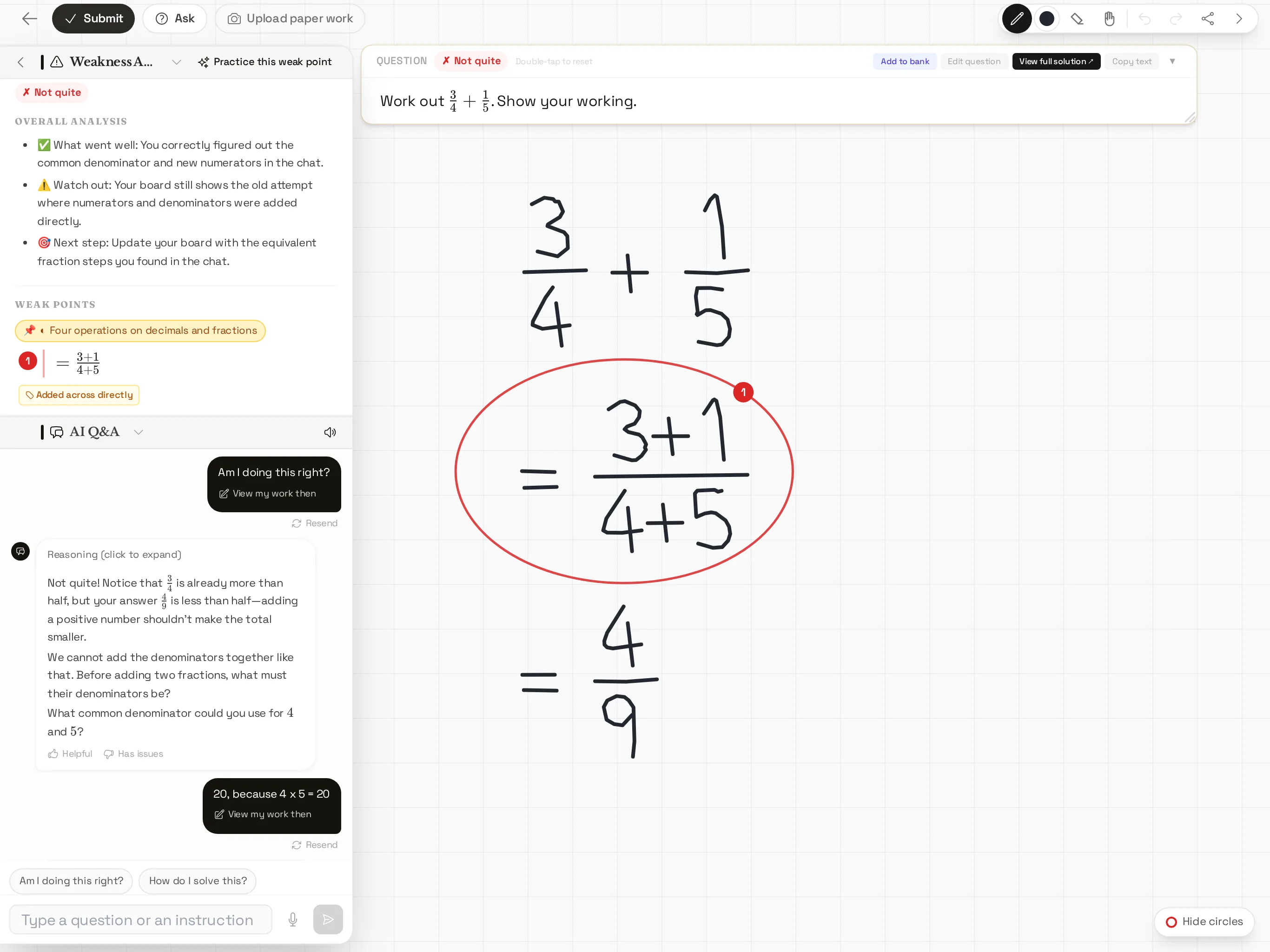 Screenshot from a test account (browser window the size of a 12.9-inch iPad Pro): the answer is marked wrong, the step where the denominators were added is circled, and the chat asks what the denominators need to be.
Your answer doesn't match the back of the book, and you can't see why. Most of the time the method was fine and one line went wrong: a sign dropped when you opened a bracket, two denominators added together, a term lost while completing the square. An AI math checker should point at that line — not hand you a fresh solution to copy.
That is what Gigle Tutor does. It reads your working, finds the step that doesn't follow, and circles it on your whiteboard. Then it helps you fix it, and it remembers the mistake so it comes back in your practice until it stops happening.
How it works
Three steps: bring in the problem, write your working, press Submit.
1. Snap or write by hand
Bring the problem in however it reaches you: take a photo, paste a screenshot, paste the text, or upload a PDF and pick the pages you need. If a page has several problems on it, Gigle splits them apart and you tick the ones you want — a question with parts (a) and (b) stays together as one problem. If your photo already includes your handwritten working, it is transcribed as you wrote it, mistakes included, so the checker sees what you actually did.
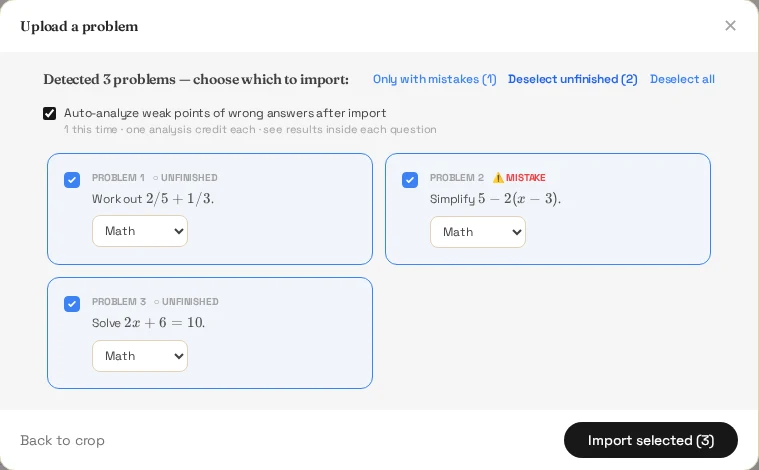 Screenshot from a test account: one photographed worksheet becomes three problems to tick; the one whose handwritten working has a mistake is flagged.
Then work on the whiteboard under the problem. On an iPad you can write with Apple Pencil or your finger; on a laptop you can use a mouse or trackpad.
2. The wrong step gets circled
Press Submit. The AI marks your answer right or wrong and, when something is off, circles the step on your whiteboard where it went wrong. Next to it you get a short weak-point analysis: what kind of mistake it is and which topic it belongs to. You don't have to compare your page with a full solution line by line — the checker has already done that.
3. Fix it yourself, with questions
Open the chat beside the whiteboard and ask about the circled step. The tutor can see your whiteboard and the marking, so you don't need to retype anything. Instead of pasting the answer, it asks you a question about that step — for example, what happens to the minus sign when you multiply out the bracket — and lets you make the correction. You can type or ask out loud with your voice, and when a picture helps, it can draw an interactive graph or a short animation.
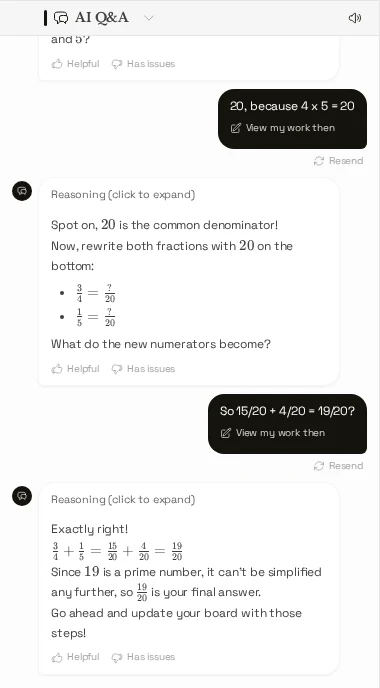 Screenshot from a test account: the student finds the common denominator and fixes the answer themselves.
Checker vs solver: why seeing your own mistake matters
A math solver starts from the problem and shows its own solution. A math checker starts from what you wrote and tells you whether each step holds up and where it broke.
The difference matters because the step you got wrong is rarely random. It is usually a habit — always forgetting to change the sign on the second term, or treating 3/4 + 1/5 as 4/9 — and that habit will cost you marks again on the next test. Reading a correct solution doesn't show you the habit. Seeing your own line circled does.
What happens after the check
Finding the wrong line is only half the job. Gigle keeps going for the next few days.
Not just a wrong-book: your own record of why you go wrong
An ordinary mistake notebook keeps track of which problems you got wrong. Gigle keeps track of why: every real mistake is saved automatically with the reason it went wrong, its topic and the type of mistake, plus the technique and how to avoid it next time. The more it collects, the more it becomes a record that is only about you — sort by type of mistake and you can see which slips keep costing you marks.
You can sort it by what needs the most work, by type of mistake, or by topic, and open any item to see the original whiteboard, the diagnosis and the conversation you had about it.
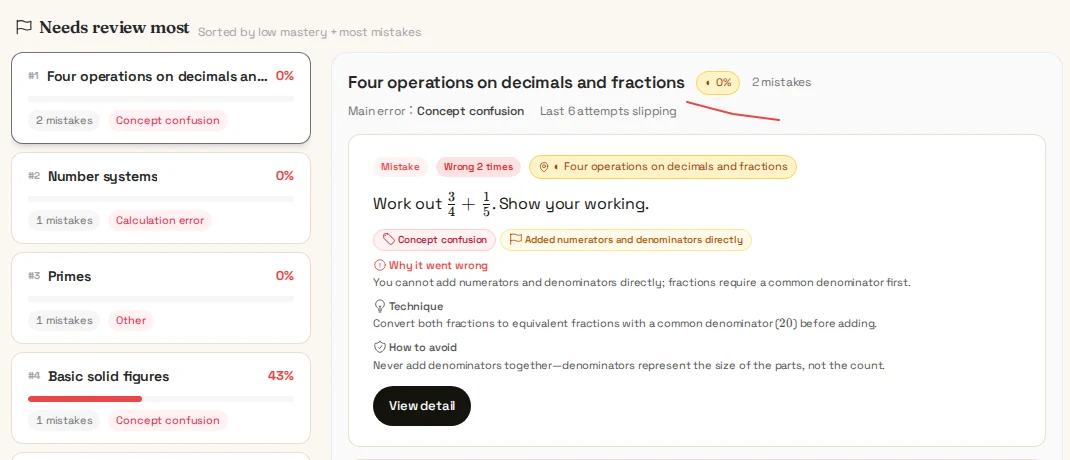 Screenshot from a test account: fraction mistakes filed under their topic, with why it went wrong, the technique and how to avoid it.
Finding the real root cause
When the same kind of mistake keeps showing up, the problem may be a step or two further back. Stuck on factorising quadratics? The gap might be in expanding brackets or in negative numbers. Gigle links topics to the ideas they build on, so when you keep missing one, it traces back and has you shore up the foundation first.
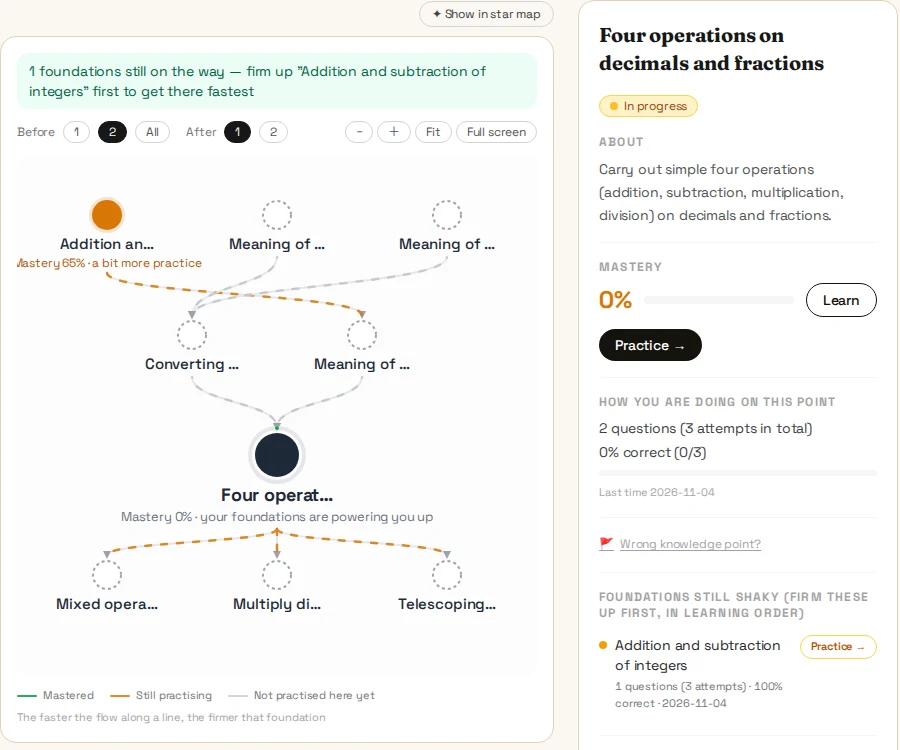 Screenshot from a test account: the fraction topic with the topics it builds on; the shaky foundation is flagged to practise first.
A daily 5 on your weak points
The daily challenge turns your mistakes into a short routine: review up to 3 problems you got wrong, look at up to 3 weak topics, then do 5 targeted practice questions. It takes a few minutes, and the problems are picked from your own record, not from a generic list.
See progress
The knowledge star map lights up topics as you get them right, so you can see what is solid and what is still dim. The weekly report compares this week with last week and shows your weakest topics, so you know where to spend the next session.
What it covers
Gigle is built mainly for school math, and it also handles physics and chemistry problems. You can choose the syllabus you follow, and the practice and topic map follow it:
- General grade bands from Grade 1 to Grade 12
- Singapore: PSLE, O-Level E-Math and A-Math, A-Level H2 Math
- China: the national curriculum standards for primary, middle and high school, plus primary olympiad math
The interface comes in English, Chinese, Japanese and Korean, and the explanations follow the language you choose. It runs in the browser on a computer, iPad or phone — there is nothing to download, and on an iPad you can write your working by hand.
For parents checking homework
It's 9 pm and you don't remember how to do this one. You don't need to. Let your child work the problem on the whiteboard and press Submit: you'll both see which step went wrong, and the tutor walks them through fixing it with questions instead of giving the answer away. The weekly report shows what your child practised and which topics are still weak.
Try it on a real problem
Each of these public problem pages has a worked solution and a Work through it with AI → button:
- Show that x² − 2x + 3 is always positive by completing the square (O-Level style)
- Jane's pies and Kelly's muffins (PSLE-style word problem)
- A cube with volume 64 cm³: find the area of one face
Or read a topic first: completing the square, always positive or negative, adding and subtracting algebraic fractions, ratio and proportion.
Frequently asked questions
Is there an AI that checks my math work and shows which step is wrong?
Yes. Step-level math checkers read your own working, not just your final answer, and point to the first step that doesn't follow. Gigle Tutor does this on a whiteboard: you photograph your work or write it by hand (on an iPad, for example), press Submit, and the AI marks the answer right or wrong and circles the exact step where it went wrong. It then asks guiding questions so you fix the step yourself instead of copying a solution.
How is a math checker different from a math solver like Photomath?
A math solver starts from the problem and shows its own solution. A math checker starts from what you wrote and tells you whether each step holds up and where it broke. That matters because the step you got wrong is usually the habit that will cost you marks on the next test. Gigle Tutor also saves each real mistake, with the reason behind it, to your own wrong-book, so the same weak point comes back in your daily practice until you get it right.
Can it read my handwriting or a messy photo of my working?
Usually, yes. You can photograph a page, paste a screenshot or upload a PDF; if a page has several problems they are split apart, and handwritten working in the photo is transcribed as you wrote it. Very faint or cut-off writing can be misread, so check the transcribed problem before you submit, or write your working directly on the whiteboard.
Will it just give me the answer?
No. The checker circles the step that went wrong, and the tutor asks guiding questions so you make the correction yourself. You can still ask to see a full worked solution when you are stuck — it is just not the first thing it does.
What happens after it finds my mistake?
The mistake goes into your wrong-book automatically — not just the problem, but why you got it wrong — sorted by topic and type of mistake. If the same kind of mistake keeps coming back, Gigle traces it to the earlier ideas it depends on, and your daily challenge mixes in review and 5 targeted practice questions on your weak points.
What math does it cover?
School math from Grade 1 to Grade 12, with syllabi for Singapore (PSLE, O-Level E-Math and A-Math, A-Level H2 Math) and China, plus general grade bands. It also handles physics and chemistry problems. The interface and explanations are available in English, Chinese, Japanese and Korean.
Is it free to use?
Sign-up is free and new accounts get starter credits. AI features such as checking and tutoring use credits; you can see your balance on your credits page at any time.
Check your next problem — and stop repeating the same mistake
Sign up free — new accounts get starter credits. Works in your browser, including iPad.